Web app for companies importing into Korea
Customs Clearance ERP
Track each shipment's clearance progress, filing, payment and release deadlines, and costs on one screen.
It ties the purchase order, invoice, B/L, cargo control and import declaration numbers of each shipment to one reference.
UNI-PASS lookups and a spreadsheet
Today and with the app
| Task | Today | With the app |
|---|---|---|
| Progress | Enter a B/L number in UNI-PASS and look up one shipment at a time | Every registered shipment is looked up automatically and logged |
| Finding a shipment | PO, invoice, B/L, cargo control and declaration numbers sit in separate spreadsheet columns | Search by B/L, PO or invoice number |
| Deadlines | Work out each deadline from the bonded-entry and acceptance dates and remember it | Warnings on the dashboard and alert list before a deadline |
| Duty | A spreadsheet formula, or a question to the customs broker | Estimated customs value, duty and VAT per invoice line |
| Costs | Collect freight, storage and fee invoices and add them up by hand | A total per shipment, the unpaid amount and the number of overdue payments |
| Documents | Invoices and B/Ls spread across email and shared folders | Attached to each shipment, with a check for missing ones |
App screens with made-up data
Screen tour
The app's interface is in Korean. Captions here explain each screen in English.
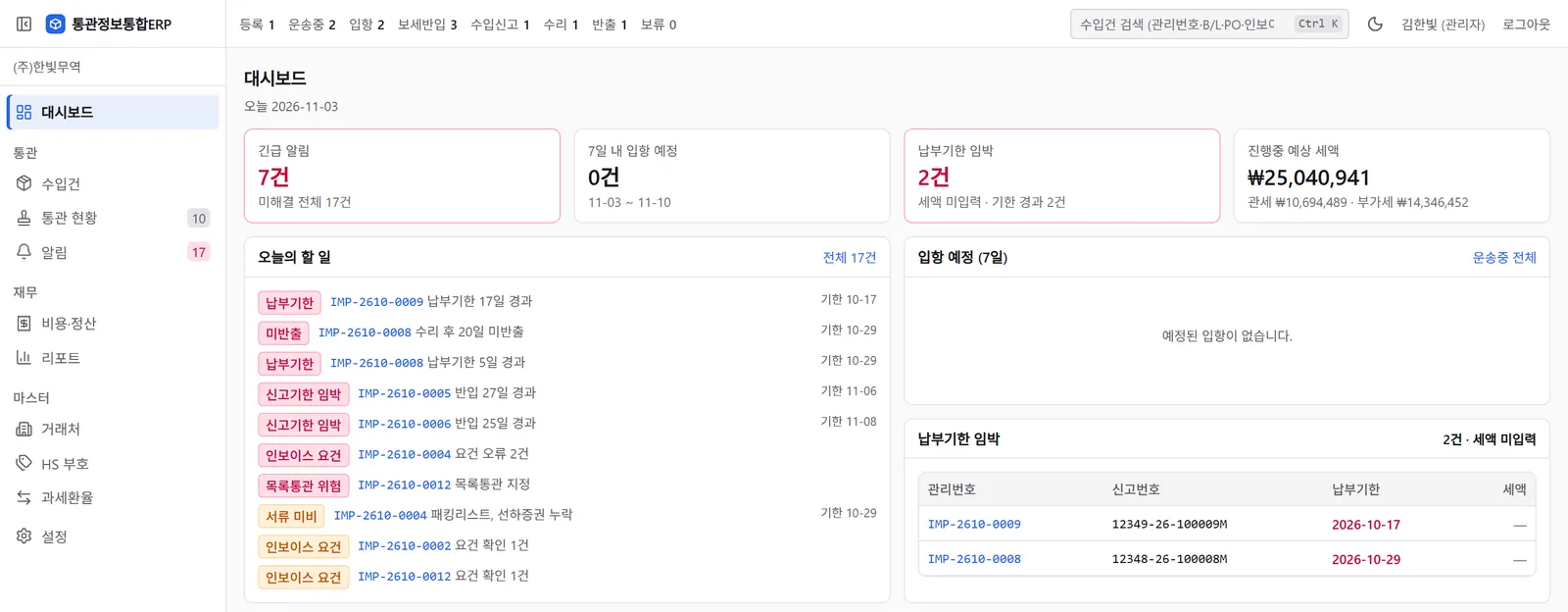
Dashboard
The first screen shows urgent alerts, arrivals in the next 7 days, payment deadlines coming up and the estimated duty of all open shipments.
- A to-do list with one line per alert: overdue payments, goods not released after acceptance, filing deadlines near, missing documents and list-clearance risk
- A table of payment deadlines with reference, declaration number and due date
- Shipment counts by status across the top
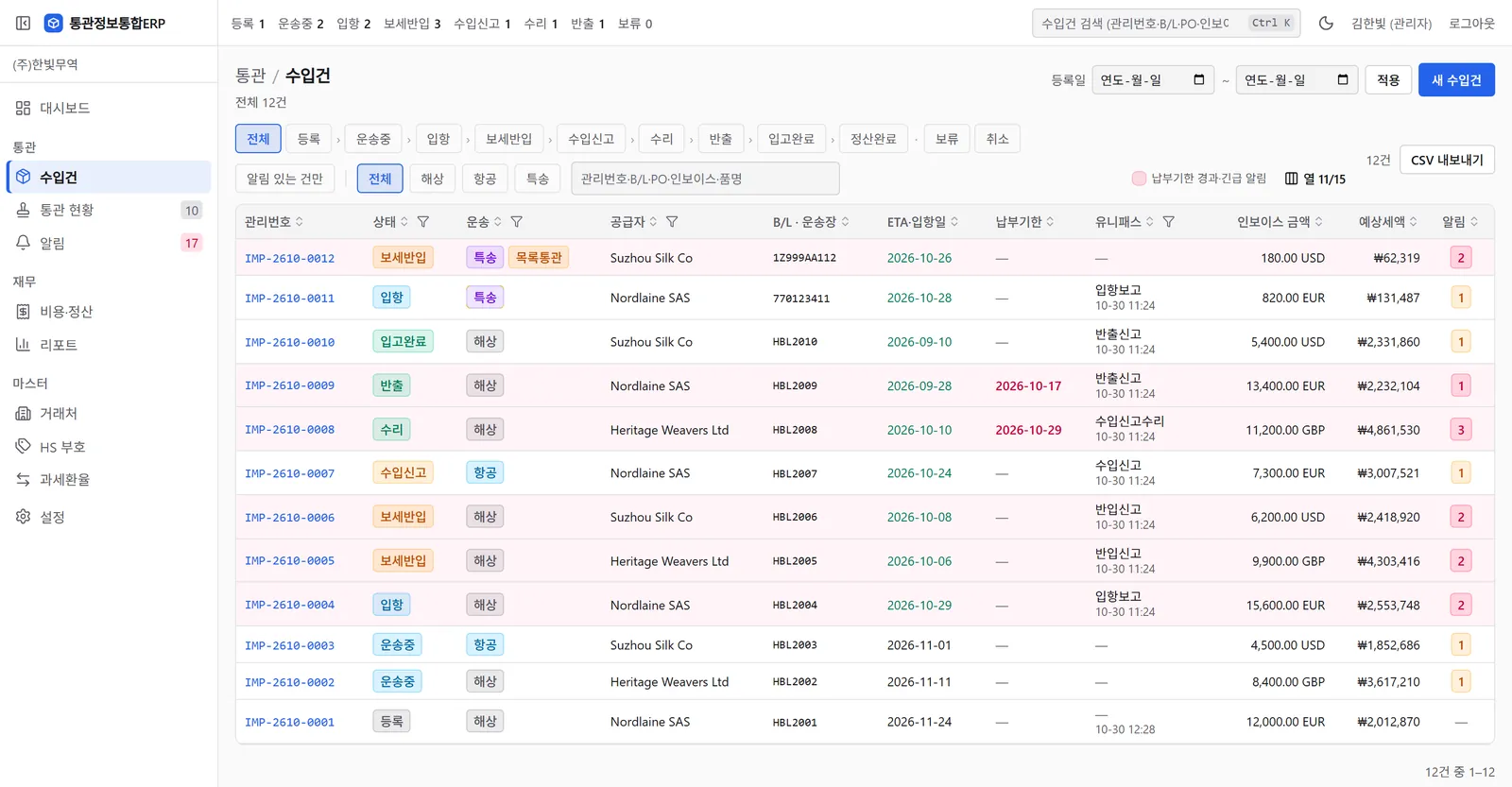
Shipment list
Twelve shipments in one table. Rows with an overdue payment or an urgent alert are tinted red.
- Status filters from registered to settled, and sea, air or courier
- The latest UNI-PASS step and when it was read
- Invoice amounts in EUR, USD or GBP, and the estimated duty in won
- A filter for shipments with alerts
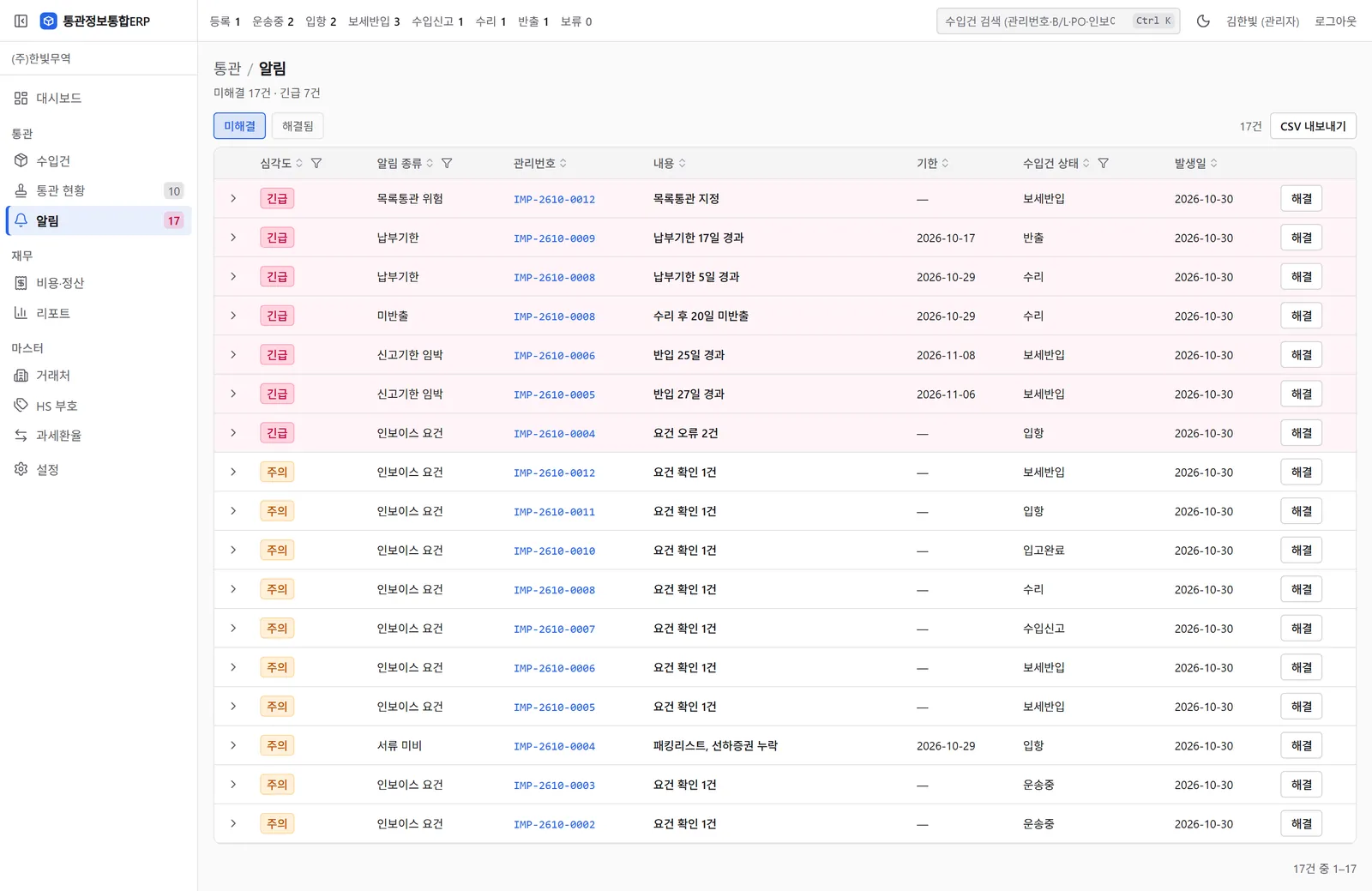
Alerts
Seventeen open alerts, seven of them urgent. Each row has a deadline, the shipment's status and a resolve button.
- Payments 5 and 17 days overdue, and goods not released 20 days after acceptance
- 25 and 27 days in bonded storage (filing deadline near)
- Missing documents: packing list and bill of lading
- List-clearance risk, and invoice check errors and warnings
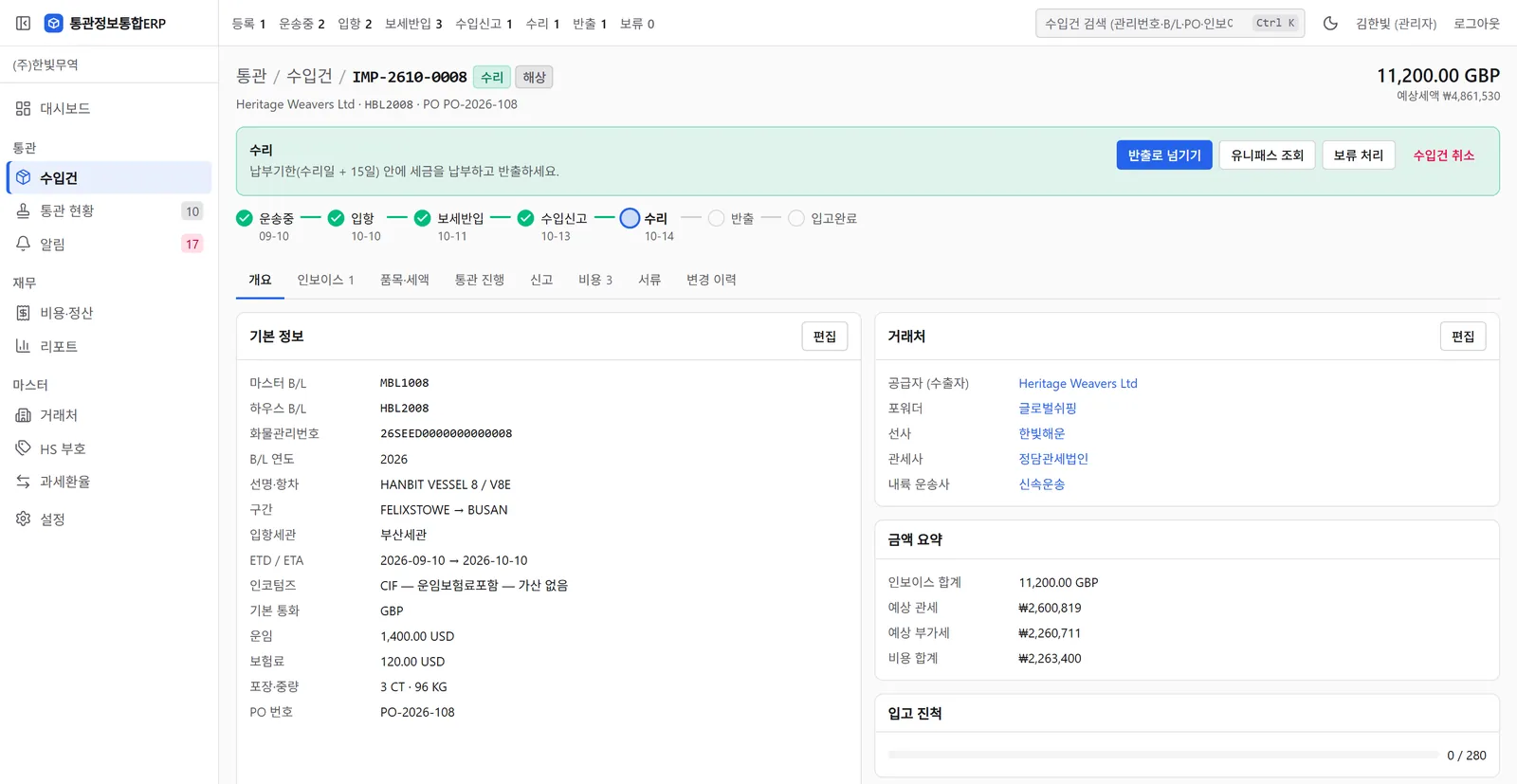
Shipment detail
One shipment's progress, numbers, parties and amounts on one screen.
- A dated progress bar from in transit (10 Sep) to accepted (14 Oct)
- What to do next: pay the duty within the payment deadline (acceptance + 15 days), then release the goods
- Master B/L, house B/L, cargo control number and PO number
- Parties: supplier, forwarder, carrier, customs broker and inland trucking company
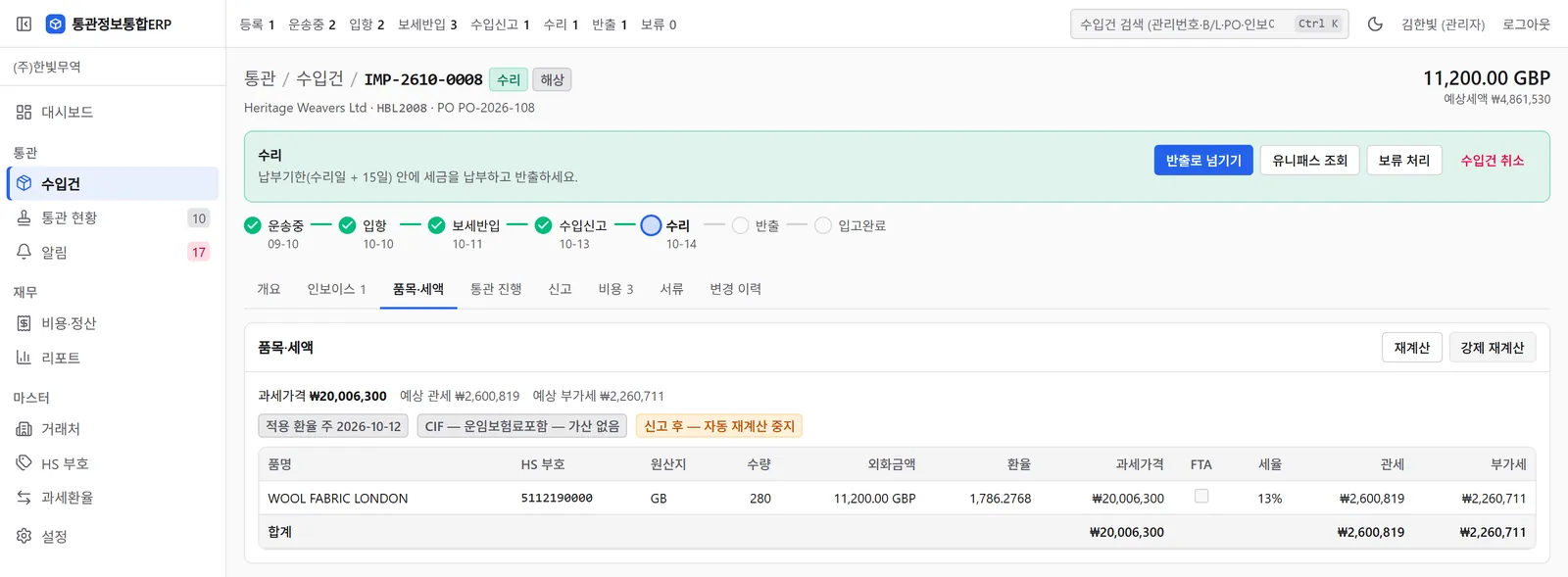
Estimated duty per line
Each invoice line has an HS code, origin, quantity, foreign amount, FX rate, customs value and rate, from which duty and VAT are estimated. These are estimates, not yet verified by a customs broker.
- 11,200.00 GBP at a rate of 1,786.2768 gives a customs value of ₩20,006,300
- At 13%, estimated duty of ₩2,600,819 and estimated VAT of ₩2,260,711
- The FX week used (2026-10-12) and whether CIF additions apply
- Automatic recalculation stops once the declaration is filed
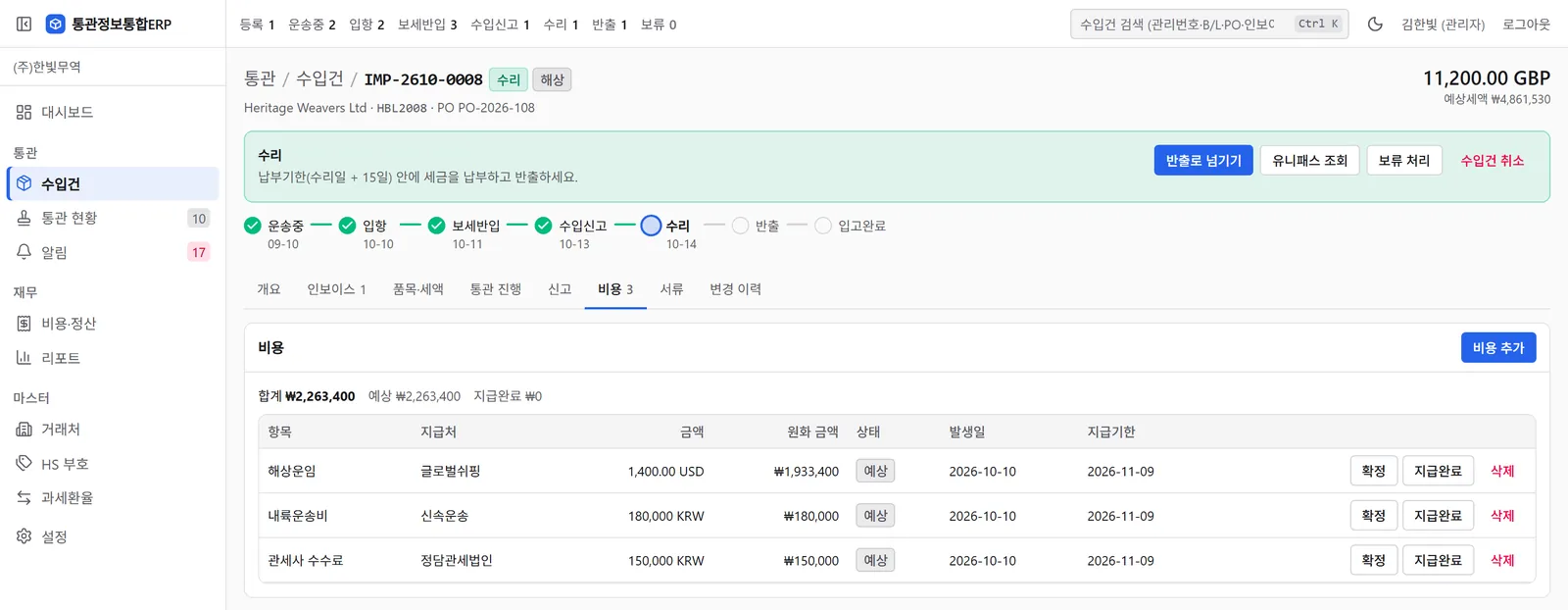
Costs per shipment
Sea freight of 1,400.00 USD is converted to won and added to inland transport and the broker fee, for a total of ₩2,263,400.
- Payee, status, date incurred and due date on every line
- Mark a cost as confirmed once the amount is fixed, and as paid afterwards
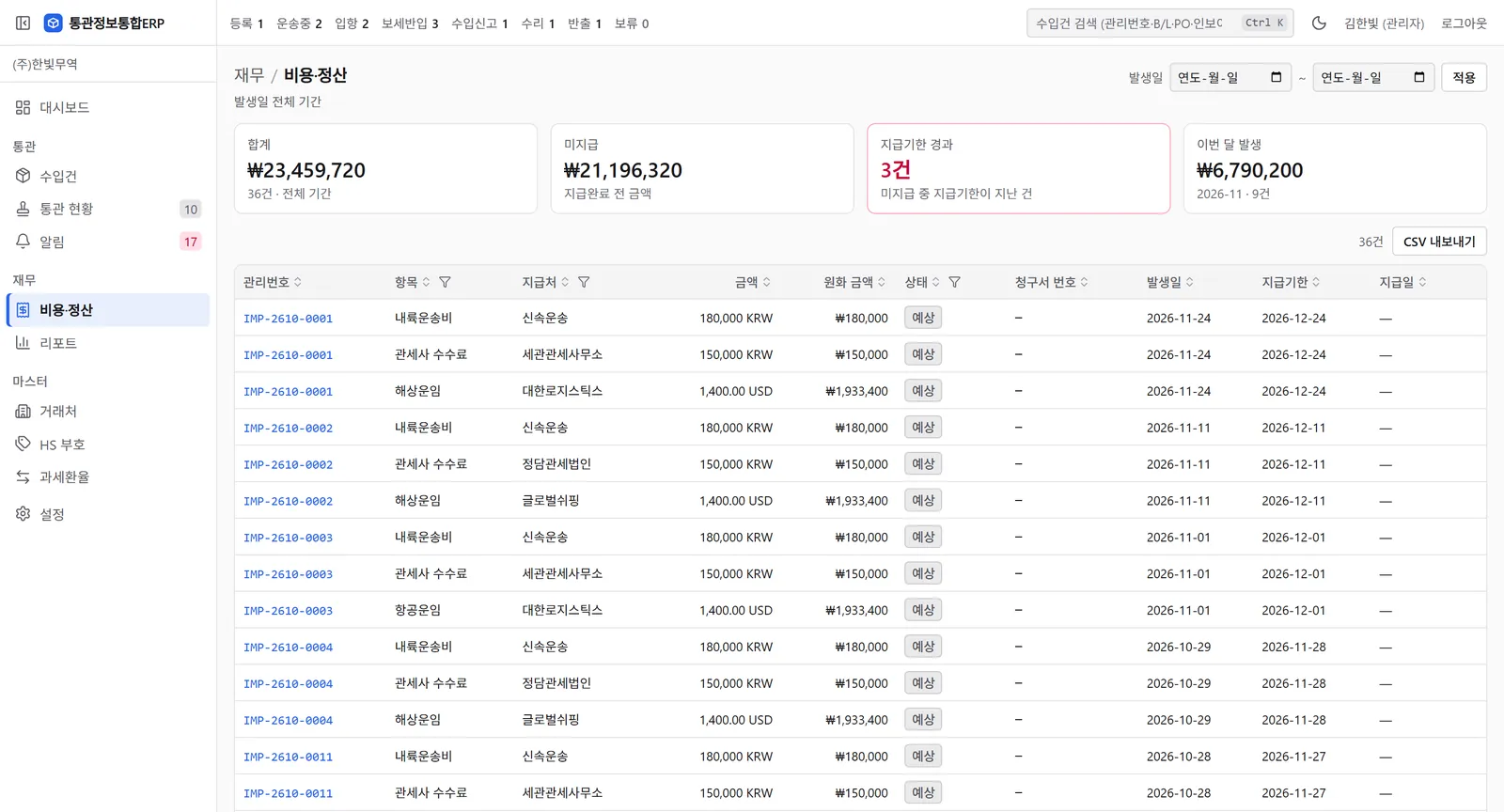
Costs across all shipments
Every shipment's costs in one table, with the total, the unpaid amount, the number of overdue payments and this month's costs.
- Freight in foreign currency converted to won
- A filter by date incurred
From registration to settlement
How it works
Add a shipment
Enter the B/L or cargo control number. Fields found in UNI-PASS are filled in for you.
Track progress
Every 30 minutes it reads arrival, bonded entry, declaration, acceptance and release from UNI-PASS and adds them to the history.
Deadline warnings
It warns on day 20 in bonded storage (30-day filing deadline), 3 days before the payment deadline and on day 10 after acceptance (15-day release deadline). If documents are missing, it warns 3 days before arrival.
Costs
Enter duty, freight, storage and broker fees, and each shipment shows its total.
Example
Deadline warnings for a made-up shipment
One sea shipment with invented dates, run through the app's warning rules. This is not a tool for working out deadlines for your own goods.
Example date
Mon 30 Mar
- In transit
- Arrived
- Bonded
- Filed
- Accepted
- Released
Alerts in the app on this day
-
Fri 6 Mar · 3 days before arrival
Missing documents warning
Warning No packing list yet, so the app shows “packing list missing”. The deadline is the expected arrival date.
-
Mon 9 Mar · Arrival
Arrival, packing list attached
The documents are complete, so the warning clears.
-
Tue 10 Mar · Bonded entry
Into bonded storage
Into a container yard outside the Busan port terminals, one of the areas with a release deadline. The filing deadline is 30 days after bonded entry: 9 April.
-
Mon 30 Mar · Day 20 in bonded storage
Filing deadline warning
Urgent The app shows “20 days since bonded entry” and updates the count every day.
-
Wed 1 Apr · Declaration
The customs broker files the declaration
The filing deadline warning clears.
-
Thu 2 Apr · Acceptance
Declaration accepted
The payment and release deadlines are 15 days after acceptance: Friday 17 April.
-
Sun 12 Apr · Day 10 after acceptance
Release warning
Warning The app shows “not released 10 days after acceptance”. After day 15 it turns urgent.
-
Tue 14 Apr · 3 days before the payment deadline
Payment deadline warning
Urgent The app shows “payment due in 3 days” (D-3).
-
Thu 16 Apr · Payment and release
Duty paid, goods released
The remaining warnings clear.
As of November 2026
Features and limits
Where alerts appear
On the dashboard, the alert list and the shipment detail screen
LimitNo email, text message or KakaoTalk alerts
Lookup volume
30 shipments per run, about 60 an hour. Shipments that have been released are no longer looked up automatically.
LimitWith more than 60 open shipments, each one is looked up less than once an hour
Estimated duty
Customs value, duty and VAT, with the FTA rate cap, per-line truncation and monthly payment deadlines.
LimitAd valorem rates only: no quota, anti-dumping or specific duties. Not yet verified by a customs broker.
Invoice checks
Required fields and amounts, and the KOR-EU origin-declaration wording and signature
LimitChecks for other FTAs have not been verified yet
Paste invoice lines
Paste lines copied from Excel. If the first row is a header, the columns are recognised.
LimitShipments and parties are added one at a time; there is no bulk import
Documents
Attach the invoice, B/L and clearance certificate to the shipment, with a checklist of required documents for sea, air and courier.
Other warnings
Customs inspection, UNI-PASS lookups failing for more than a day, a missing customs FX rate, a status that disagrees with UNI-PASS, and list clearance on a courier shipment (urgent)
User roles
Admin, clearance and logistics, finance, and read-only
Change log
Records who changed what and when, and who opened the main screens
CSV export
Save the shipment, alert and cost lists as CSV files
LimitUp to the 200 rows on the current page
One importer
Pilot terms
Pilot
Agreed when we talk
Both price and length
- An installation for your company
- The UNI-PASS connection
- Onboarding
- Bug fixes during the pilot
- Who it is for
- Importers who track clearance and deadlines in a spreadsheet or notes today
- Not for
- Forwarders and customs brokers. It cannot keep several importers' cargo apart.
- What we ask
- That you run real shipments through it and tell us where estimates differ from the clearance certificate
Getting started
Talk
We ask how many shipments you handle and how you track them today.
Agreement
Terms of use and data processing are set out in a written agreement.
Install
We set up an installation for your company and connect your UNI-PASS keys.
Pilot
You run live shipments through it. Where an estimate differs from the clearance certificate, we fix the software.
Scope and status
A licensed customs broker files the declaration
What the app does not do
Your customs broker keeps preparing and filing your import declarations.
- Duty figures are estimates you make for your own shipments. We do not classify goods or compute duties for you, and the final amount is the one on the import clearance certificate.
- The duty calculation has not yet been checked by a customs broker.
As of November 2026: preparing the pilot
The pilot starts once this work is done. You can talk to us now.
- Comparing estimates with real clearance certificates, with a customs broker
- Stronger sign-in: two-step verification or an IP allow list
- Automatic backups of the database and attachments, and a restore drill
- The terms of use and the data processing agreement
- Fixing known bugs: false errors on KOR-US invoice checks, and bonded-transport departures read as final release
Questions
How is this different from looking things up in UNI-PASS?
UNI-PASS answers one lookup at a time. This keeps every shipment's progress history together with its deadlines, costs and documents.
Do I have to change customs brokers?
No. Your current broker keeps filing your declarations.
Where is the data stored?
In the database of your company's own installation, which is not shared with other companies. The standard setup runs in the Seoul region.
Is the interface available in English?
No. The app's interface is in Korean only.
What do I need to get started?
UNI-PASS Open API keys issued to your company. We handle the installation and the connection.
Does it work for forwarders or customs brokers?
Not yet. It cannot keep several importers' cargo apart, so each installation serves one importer.
Next step
Ask about the pilot
Send your company name, monthly shipment count, main transport mode and how you track shipments today, and we will reply with a time to talk.